Kevin Liu, Achraf, and I recently released tpcgen-cli 4.0.0 to generate TPC-H and TPC-DS benchmark data directly in Parquet, CSV, and the reference text formats. It is over 10x faster than other tools, generates fully TPC-compliant data, and makes running analytic benchmarks easy.
I hope my experience in the last few weeks mirrors what software engineering will become. Working with Kevin and Achraf (and their AI agents) was pleasant and rewarding compared with some of my other recent AI experience. We set the goals and refined the APIs, reviewed the code, demanded (a lot) of evidence of correctness, and then iterated on performance. Every PR was a joy to review because it had clearly been written by an AI agent and then honed by a human who cared about my time and the code.
See it in action
The easiest way to see why this is cool is to try it yourself (it takes me longer to type the command than to generate scale factor 10 data on my three-year-old MacBook Pro):
uvx tpcgen-cli tpcds parquet -s 10 --output-dir /tmp/tpcds-sf10 # TPC-DS
uvx tpcgen-cli tpch parquet -s 10 --output-dir /tmp/tpch-sf10 # TPC-H
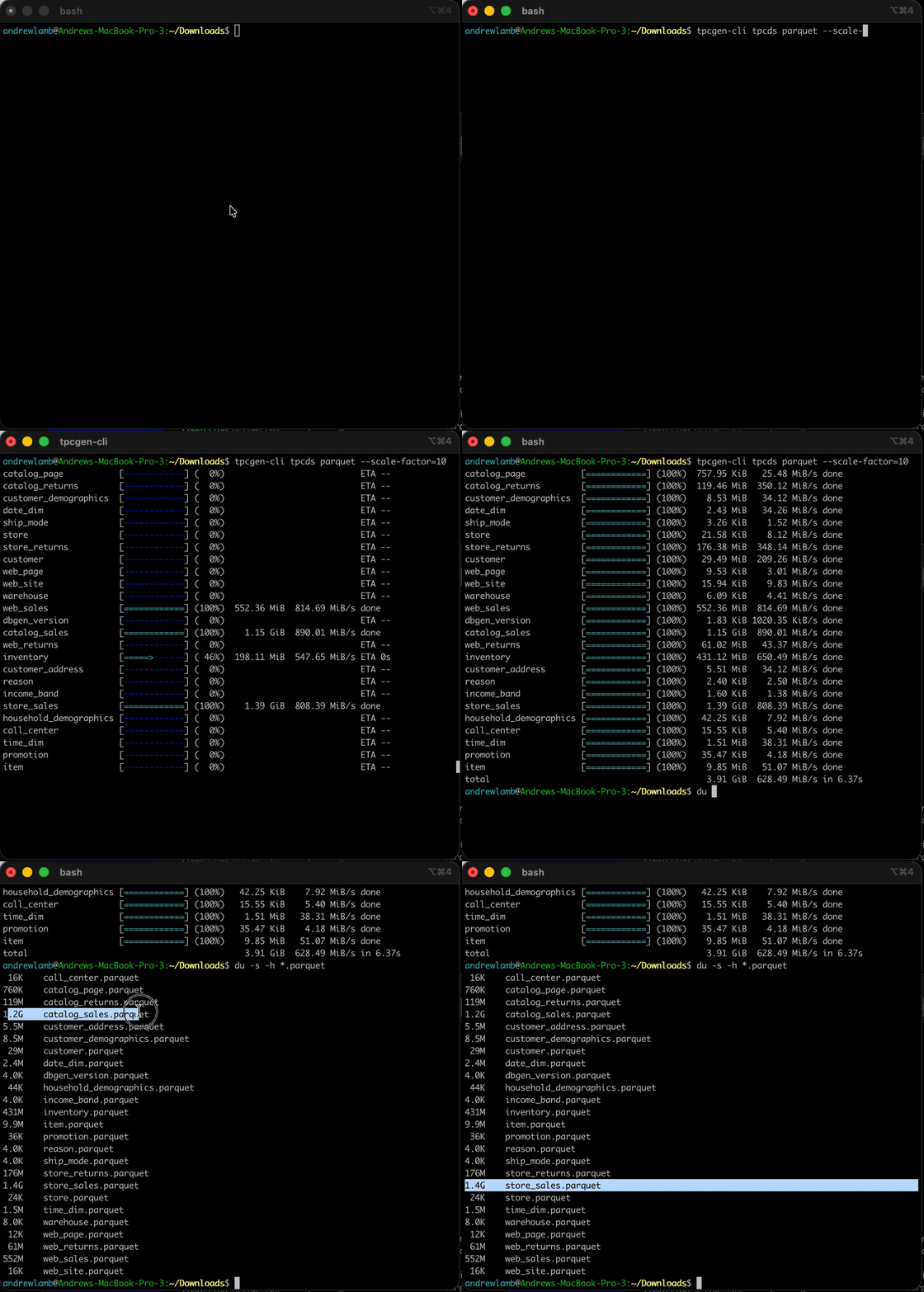
You can also install it via PyPI or Homebrew, or build it from source via crates.io (see the CLI documentation for more).
uvx
With uv installed, run:
uvx tpcgen-cli@4.0.0 tpcds parquet -s 1 --output-dir /tmp/tpcds
PyPI
Install the package in a Python virtual environment:
python3 -m venv .venv
source .venv/bin/activate
python3 -m pip install tpcgen-cli==4.0.0
tpcgen-cli tpcds parquet -s 1 --output-dir /tmp/tpcds
Homebrew
Install with Homebrew:
brew install tpcgen-cli
tpcgen-cli tpcds parquet -s 1 --output-dir /tmp/tpcds
Install from source
With Rust 1.88 or newer installed, build the release from source:
cargo install tpcgen-cli --version 4.0.0 --locked
tpcgen-cli tpcds parquet -s 1 --output-dir /tmp/tpcds
What’s new in 4.0
Highlights (see the release notes for everything):
- A unified
tpcgen-cliCLI for both TPC-H and TPC-DS, with parallel generation and--parts/--partfor generating datasets in multiple files. - TPC-DS output that matches
dsdgenbyte for byte, plus a Trino compatibility mode. We tested all valid TPC-DS scales, up to SF 100,000. See the testing guide for details of our obsession with correctness. - Progress bars with ETA and throughput.
- Configurable Parquet settings such as per-column encodings and field IDs.
- Pure Rust libraries with no dependencies for both generators (tpchgen and tpcdsgen), plus libraries for generating Apache Arrow data directly (tpchgen-arrow and tpcdsgen-arrow).
10x performance, flat memory
These charts are reused from the project overview and CLI documentation.
TPC-DS
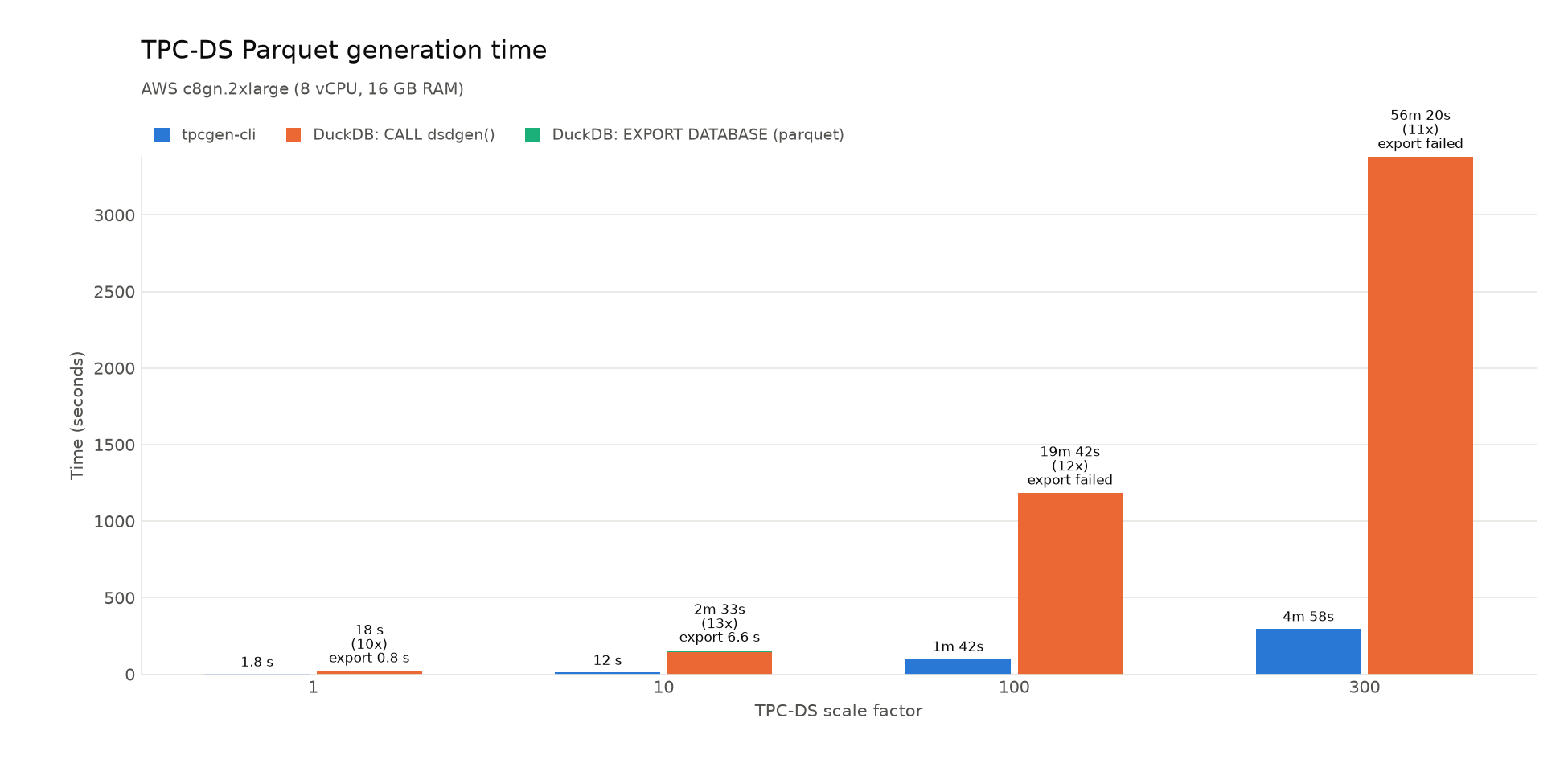
On an AWS c8gn.2xlarge with 8 vCPUs and 16 GB RAM, generating SF100 directly
to Parquet took about 1 minute 42 seconds. DuckDB’s internal data generation
took about 19 minutes 42 seconds; its subsequent Parquet export ran out of
memory at SF100 and SF300. See the benchmark methodology for details.
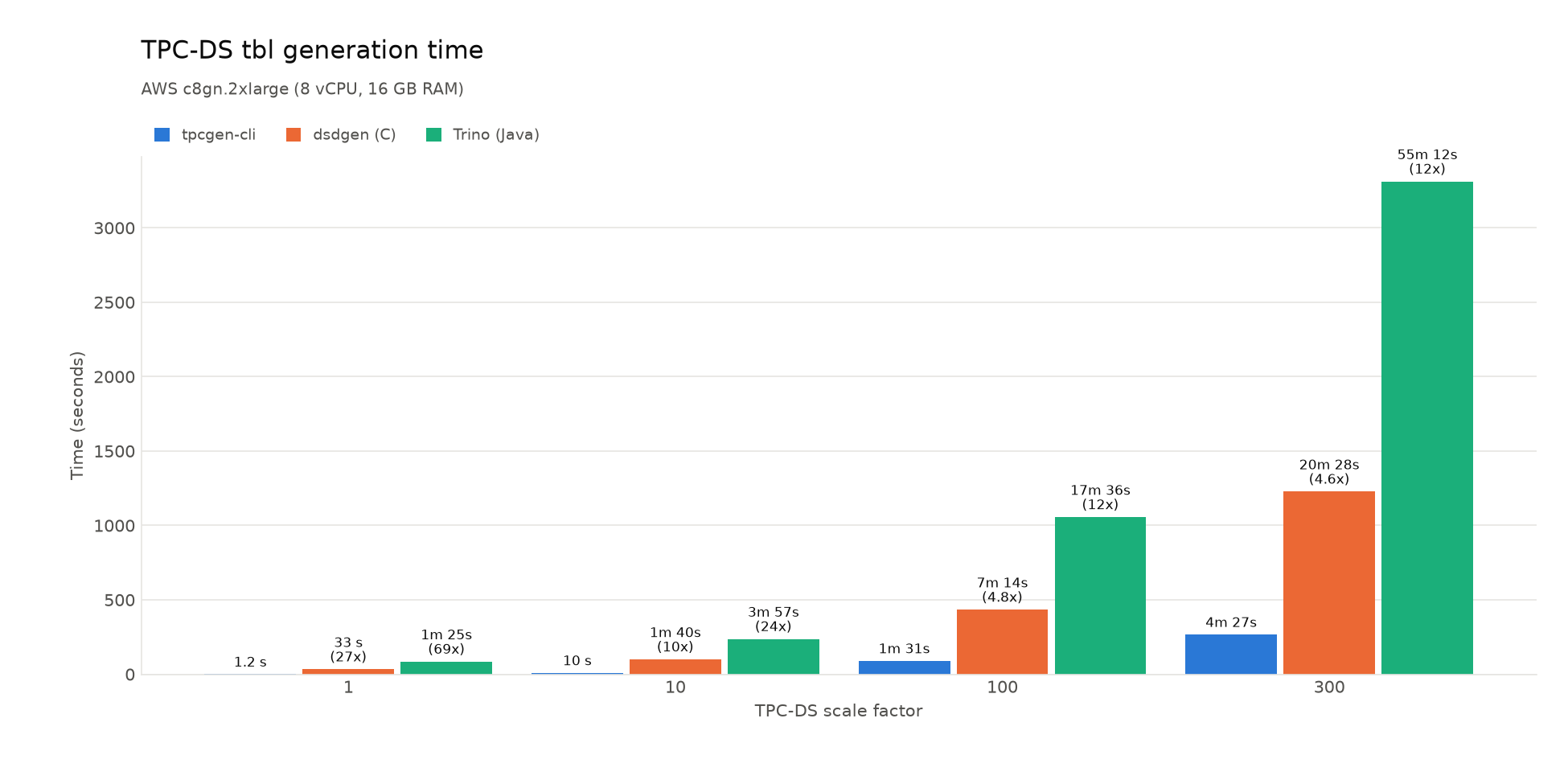
For CSV-like .dat output on the same machine, tpcgen-cli was 4.6–27x faster
than dsdgen and 12–69x faster than Trino’s Java implementation. At SF100,
generation took about 1 minute 31 seconds, compared with 7 minutes 14 seconds
for dsdgen and 17 minutes 36 seconds for Trino. See the benchmark methodology
for details.
TPC-H
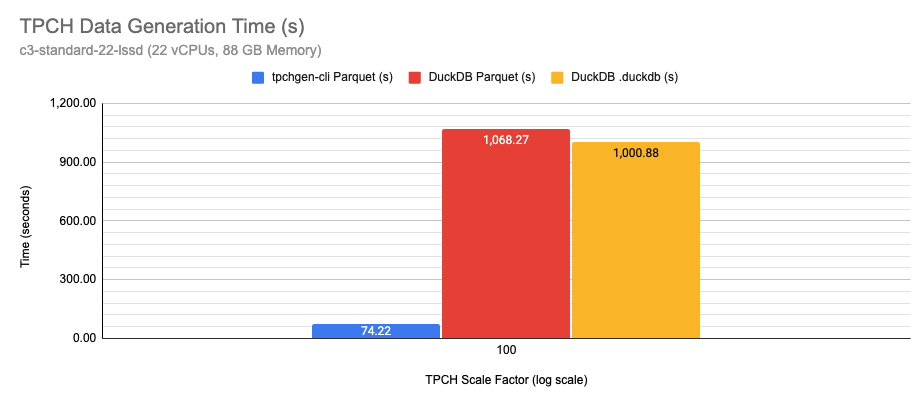
This TPC-H comparison used a c3-standard-22-lssd with 22 vCPUs and 88 GB RAM.
At SF100, tpchgen-cli generated Parquet in about 1 minute 14 seconds, compared
with 17 minutes 48 seconds for DuckDB—about 14x faster. DuckDB’s internal data
generation alone took about 16 minutes 41 seconds. See the
TPC-H performance spreadsheet for details.
Database connoisseurs choose tpcgen-rs
People are already using tpcgen-cli and tpchgen-cli, which is immensely
satisfying. A few sightings in the wild:
- Microsoft LakeBench vendors
tpcgen-clibinaries. - The benchmarks in the Polars 2.0 release post used
tpcgen-clito generate their data. - DuckDB has used
tpchgen-cliin four posts: Framework Laptop 13, v1.4 LTS benchmark, Vortex extension, and NVIDIA Vera. - Other blog posts include Lakehouse benchmarks, a CSDN single-node comparison, and tpchgen-rs on a Raspberry Pi.
- Bug reports in Daft, Polars, and chdb use
tpchgendata. - Vortex, LakeSoul, and Spice AI use the Rust crates.
- Polars benchmarks and MotherDuck’s cookbook use
tpchgen-cli.
My personal favorite sighting in the wild is the DuckDB TPC-H extension
(part of what inspired me to work on this tool). Its documentation now
explicitly directs people to tpchgen-cli for fully TPC-compliant datasets 😎:

If you use the project, please tell us about it.
What’s next
First, I need a break to focus on other projects for a while.
After that, for our 4.1 release, we are considering features such as writing directly to cloud object storage (S3, Azure Blob Storage, and GCS), as well as support for Vortex output.
Thank you for your attention. Happy benchmarking.